Documentation
From a sentence to a robot that moves
A project in Holocron Engine walks through eight steps. Each step is its own screen with its own checks. Algorithmic steps are free and instant; steps that use a language model show their cost before they run.
Before you start
- A desktop browser with WebGL 2. Chrome or Edge if you want to flash a board over USB from the app.
- An idea in one or two sentences: what the robot should do, roughly how big, indoors or outdoors, wheels or legs.
- Optionally a photo or sketch. The Concept step can read it.
Units are metric everywhere: millimetres, grams, newton-metres. Parts come from a catalog of real, purchasable components with their true dimensions and 3D models, so what you see is what you can order.
Concept AI
Describe the robot in plain language or upload a photo. The model asks back only what it needs: task, size, environment, payload, budget. Numbers come later; hardware and connections come first. The result is a short written brief that every following step reads.
Output: project brief · Checks: none yet · Cost: a few cents per conversation
Drive algorithm
Motors, servos and gearmotors are picked from the catalog against the brief: required torque with a safety factor, speed, voltage, mass. You can override any pick. Legged robots get one actuator per joint with the load computed from limb geometry; wheeled robots get drive and steering.
Output: actuator list with part numbers · Checks: torque margin, voltage match · Cost: free
Layout algorithm
A top-down 2D plan: where the body, wheels or legs, arm, battery, boards and payload sit. Distances and clearances are computed, not drawn by hand. Hover a part to see its role and real dimensions. Sensors get positions and viewing directions here, so later steps can verify nothing blocks them.
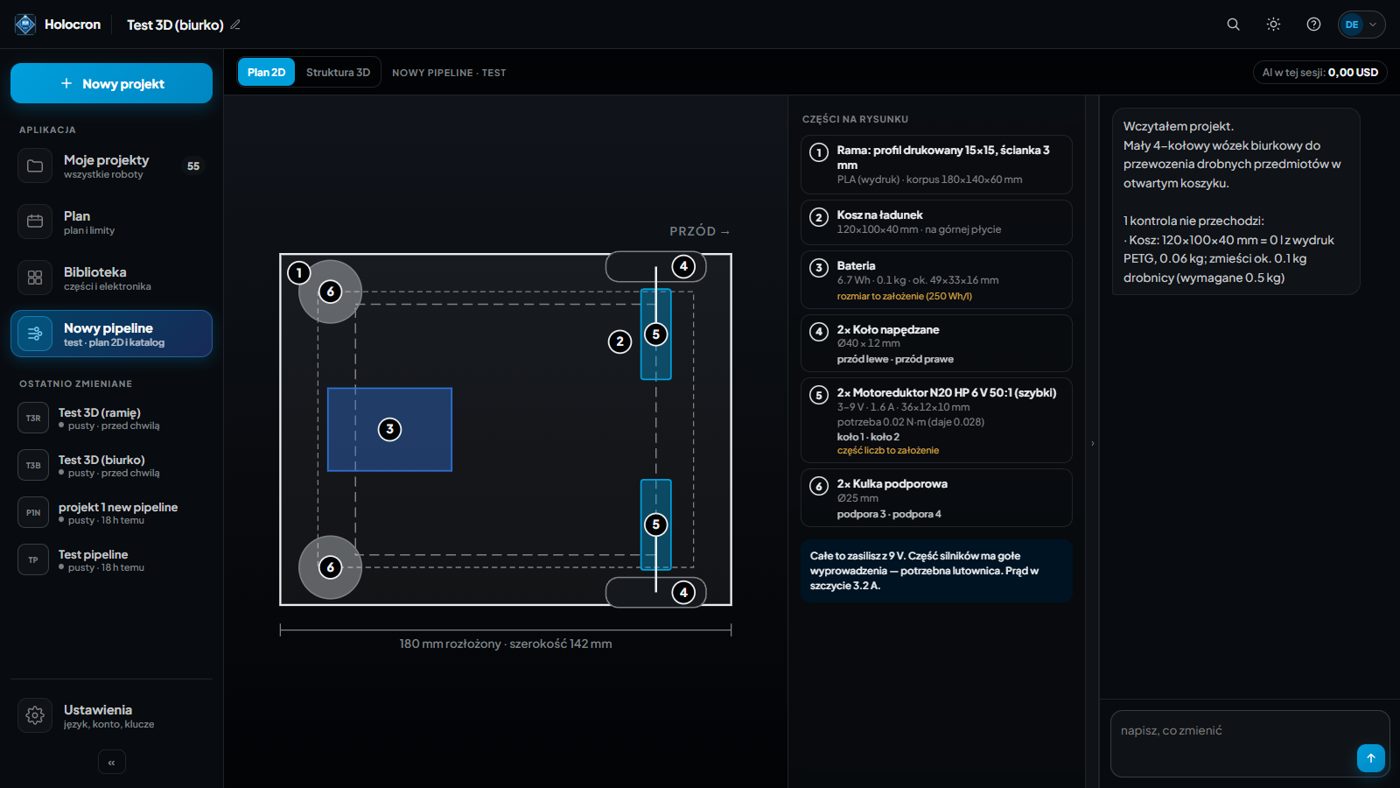
Output: 2D plan, parts list · Checks: payload fits, stability, ground clearance, sensor directions · Cost: free
Structure algorithm AI optional
The frame, plates, brackets, standoffs and cable runs are built from the plan: aluminium profiles and printed plates for large bodies, plates only for small ones, a compartment for electronics, a cradle for the battery. Everything is a real part or a printable solid with a material assigned. An editor lets you move, rotate, hide or delete any element; edits are stored as data and re-checked.
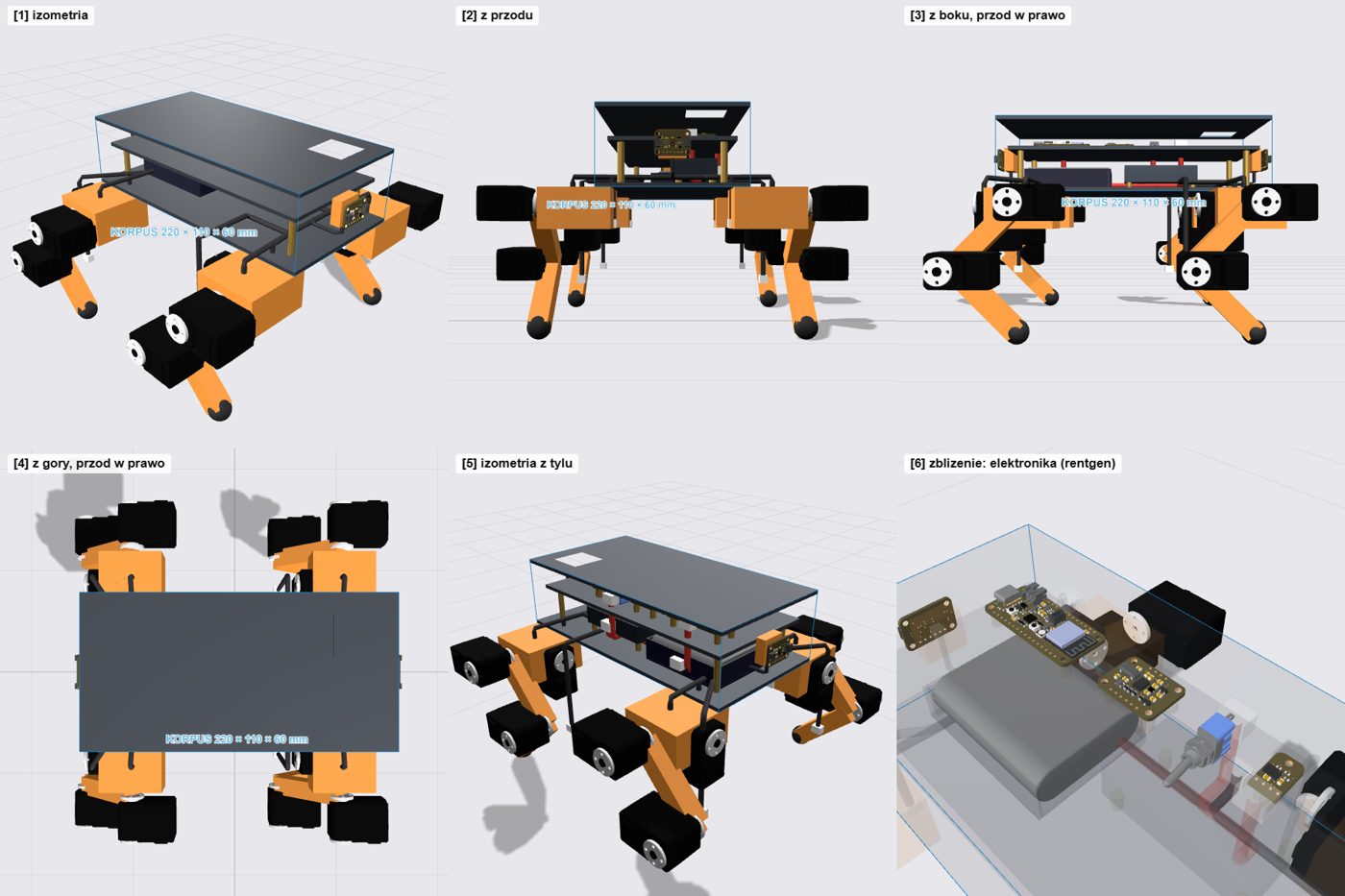
Two extra tools live here. Download model gives you a package with URDF, one STL per part, convex collision hulls, masses and joint limits, plus a MuJoCo variant and an Isaac Sim script. Mechanics test runs that model in MuJoCo: loose parts, parts that touch nothing, interpenetration, drop test with servos as position controllers, joint range without new collisions, tip-over angle, and a simple trot for legged designs.
Output: 3D structure, connection list, fasteners, URDF + STL package · Checks: fit, cables reach every part, sensor field of view, physics test · Cost: free; optional AI assembly a few tens of cents
Electronics algorithm in progress
The brain, motor drivers, power path and sensors are listed with pin assignments derived from the drive list: which servo bus goes to which UART, which sensor to which I²C pins, which GPIO powers what. The 2D wiring diagram is being built; today you get the tables.
Output: hardware list, connection table with pins · Checks: supply voltage and current per rail · Cost: free
Exterior AI
Body panels are designed as a separate layer over the structure. You describe the look in conversation; the model writes the panel geometry, the engine renders it on top of the real frame and measures clearance to every part and every sensor's line of sight. Panels that cut into a part or blind a sensor come back as errors and the model gets one round to fix them.
Output: panel geometry over the structure · Checks: clearance to parts, sensor visibility · Cost: a few cents per design round
Print algorithm in progress
Parts to make, grouped by material, with dimensions; parts to buy with part numbers; and the fastener list computed from where parts actually touch: screw size, length, head side, inserts and hook-and-loop straps for batteries. Print-ready STL export per part is being finished.
Output: make list, buy list, fasteners · Cost: free
Code algorithm AI optional
Firmware is generated for the board you chose: Arduino C++ for ESP32-class boards, Python for a Raspberry Pi. It drives the exact actuators in your design (bus servos with sync write, PWM servos, DC drivers, steppers), reads the sensors, and includes gait or drive logic with the numbers from your layout. It is compiled before you see it. A live 3D preview on the left runs the same code so you can see the robot walk or drive before it exists.
Commands work over serial and over the board's own Wi-Fi access point. In Chrome or Edge you can flash the board straight from the app; elsewhere download the project and use Arduino IDE. Ask the AI assistant for changes, for example a new command; the result is compiled again before it replaces your code.
Output: compiled firmware, pin map, simulation · Checks: compiles, achievable speed versus requirement · Cost: free; AI edits a few tens of cents
Honest limits
- Checks are computed, but they are not a certification. A person who can build the robot has to review the design before parts are ordered or a motor is powered.
- The catalog covers hobby and light-industrial parts. Very high torque actuators are still being added.
- Steps marked in progress produce partial output today. What is shown works; what is missing is not hidden behind a disabled button.
Something unclear? Ask us, and we will fix the docs as well as the answer.